Changelog

What we shipped, when. Product updates from the SageOx team.

Console

Voice ID reminders that know when to stop

Friendly reminders to set up Voice ID, record your first Discussion, and cast to the room TV: frequent at first, rarer each time, and silent once you're done.

  • Get named in your team's Discussions. If your coworkers' Discussions keep showing an unnamed speaker and you haven't set up Voice ID, SageOx reminds you in the app. If that reminder goes unread, an email may follow. Reminders come every few days at first, then further apart, and stop the moment you set up Voice ID.
  • Each reminder says something new. Every one takes a different angle and only suggests features you can actually use, so the seventh email doesn't read like the first. You always see which reminder you're on and how many are left.
  • Getting started, with gentle follow-ups. New accounts that haven't recorded a Discussion get a short series of tips on importing a Loom, recording from your phone, and more. Teams who can cast get ideas for putting a Discussion on the meeting-room TV.
  • You control the reminders. Follow "Stop these" from the bell to Settings, Notifications, where you can turn off a series's in-app reminders and emails.
  • Invite a coworker to set up Voice ID, sent by SageOx. On the team consent page, "Invite to enroll" now sends the invitation for you instead of opening your mail app.

See Getting started for how Voice ID tells who said what.

Console

Saved page, simpler notifications, richer playback

Everything you saved in one place, notification settings in two choices, and playback that follows along.

  • One Saved page for your team. Discussions, sessions, plans, chats, and murals you saved sit together under Saved. Search by title, people, or source, filter by type, and unsave anything right from its card or preview.
  • Notification settings in two choices. Pick where you're reached, then how much: Everything, Important only, or Essentials. The per-type switches are still there under Customize.
  • Playback that follows along. A play-head tracks the transcript as a discussion plays, and the transcript scrolls with it. Click any timestamp to jump there. Photos and murals appear inline in the transcript.
  • Nudge a coworker to set up Voice ID. When you name an unknown speaker as a coworker who hasn't set up Voice ID, you can send them one email inviting them to, at most once every two weeks.

See Getting started for how Voice ID tells who said what.

CLIv0.23.0

Bring past sessions into your Ledger

Preview past AI sessions, search recordings, and give your AI coworker a screen walkthrough it can read.

  • Choose which past sessions to share. ox session import previews Claude Code and Codex sessions in the terminal or a local browser before you select them for your team's Ledger.
  • Find recorded conversations by keyword, person, and date. ox conversation search returns matching passages you can open in context.
  • Give your AI coworker a screen walkthrough it can read. ox conversation walkthrough pairs clicks and screen stills with the narration at each moment.
  • Import audio and video recordings. ox import sends media files through SageOx's recording upload flow.
  • Keep manually held sessions on your machine. ox waits for ox session upload before sharing them with your team.
  • Plan review answers survive reloads and sync. Repeated submissions no longer duplicate answers, resolved items stay resolved across machines, and the page shows whether your answers reached the team.

Full release notes.

Console

Find every discussion with a coworker

Filter the Discussions page by one or more people, and the count and total time follow.

  • Filter Discussions by people. Pick one or more coworkers from the new People control on the Discussions page. The list, the discussion count, and the total time narrow to the discussions they were in.
  • Counts that follow the window. Each person shows how many discussions they were in. Pair it with When to see just this week or this month.
  • Finds people however they took part. Someone counts if they recorded the discussion, joined it live, were recognized by Voice ID, or were named when a coworker fixed the speaker labels.
  • Works in every view. Cards, List, and Calendar all honor the filter.
  • Share the filtered view. The selection is part of the page link, so a coworker who opens it sees the same discussions.
Console

ChatGPT hears your team

Connect ChatGPT once and it hears your team: coworkers' Murmurs and finished Discussions reach it, and what you decide there reaches your team.

  • Your ChatGPT knows what your team did. When a coworker posts a Murmur or a team Discussion finishes, your AI coworker in ChatGPT gets it as context and brings it up when it bears on what you are doing.
  • Your team hears what you decided. Decisions and blockers from your ChatGPT conversations reach your team as short Murmurs on their own, from your AI coworker, and only when something new is worth sharing.
  • ChatGPT can act the moment something happens. Ask for an automation, such as "when a Discussion in my team is ready, summarize the decisions", and ChatGPT runs it as soon as it is.
  • A Feature Preview, on for everyone while we tune it. Choose which teams ChatGPT works with in Settings → Connections, say "off the record" in ChatGPT to stop sharing, or turn it off in Settings → Feature Preview. Tell us what you want it to hear.

Read Connect ChatGPT to SageOx to set it up in two minutes.

CLIv0.20.0

Comment on the exact words in a plan

Highlight a phrase in plan review, hand your AI coworker a recording link, and keep teammates' sessions intact.

  • Comment on exact words in a plan review. In ox plan review, drag across a phrase or double-click a word to comment on just that text. Your AI coworker sees the quoted words next to your note. A plain click still marks the whole section.
  • Paste a SageOx link and your AI coworker opens the recording. ox conversation commands accept sageox.ai recording and share links. ox conversation transcript --frames adds what was on screen and what the narrator pointed at.
  • Opening a teammate's session no longer rewrites it. Viewing or downloading a session used to regenerate its title and summary on your machine and publish them over the original.
  • Ledger sync recovers when it falls far behind. An interrupted update now carries through to the end instead of stopping and asking for manual git repair.
  • Recordings and Team Context open only for your team. ox conversation and ox agent team-ctx check that you're signed in and still on the repo's team before they show anything. Credentials ox recognizes, such as the output of aws configure export-credentials, now stay redacted even when a command and its output are recorded separately.
  • ox now sends usage data, and you can turn it off. Starting with v0.19.0, ox sends which commands run, how long they take, and whether they worked. It never sends your code, arguments, file paths, or anything you typed. ox config get telemetry lists what's sent, and ox config set telemetry off or DO_NOT_TRACK=1 turns it off.

Full notes are on the v0.20.0 release.

Console

Explore the scenes on your team's mural

Click a scene on your team's mural to see the discussions, murmurs and sessions it was drawn from.

  • Click a scene to see where it came from. On your team's murals page, selecting a scene opens Where this came from below the mural at that scene, with the discussions, murmurs and sessions behind it one click away.
  • The people behind each scene, in their own words. Each source shows who it came from and the sentence they wrote or said, not a second summary.
  • Explore scenes outlines every scene at once. The toggle below the mural marks each scene without hovering, so the mural works by keyboard and touch.
  • On for every team. Scene exploration was limited to early-access accounts. It is now part of every team's murals, with nothing to turn on.

Murals drawn before their scenes were mapped still show as a plain picture.

Read the murals docs to see how scenes and sources work.

Console

Discussion murals are back

Each discussion draws its mural again, and suggested speaker names read as names.

  • Each discussion draws its mural again. Once the transcript is ready, SageOx draws the discussion's mural and shows it in the Visuals tab.
  • Suggested speakers read as names. A name SageOx suggested from a voice match or a calendar invite is shown muted with a dotted underline instead of a trailing "?", so a guess still reads differently from a confirmed name.
  • One clear empty state. A discussion with no visuals says "No visuals." once, and notes that the mural comes after the transcript while the recording is still processing.
CLIv0.17.1

Install a curated add-on once, for the whole team

Install a curated add-on once and every teammate's AI coworker picks it up.

  • ox addons installs into Team Context, not into one repo. Pick an add-on and every repo on the team receives it, so every teammate's AI coworker sees the same selection. ox sync distributes it — there is no per-repo step and no second command to learn.
  • Three add-ons ship today. agent-toolkit stands up a hosted AI chat agent across Slack and Nostr; post-cutoff is a shelf of what your team has adopted that postdates your model's training; post-cutoff-jev is one brief on typed decision models.
  • An add-on is skills, rules, and the context each skill carries. The context ships inside the skill that needs it, so an AI coworker reads it exactly when the work calls for it, rather than as a dump into your Team Context.
  • Updates replace, and say what they replaced. ox addons update overwrites the files an add-on owns and drops the ones its new version stopped shipping. If your team edited one, ox names it before overwriting, so the change is one git log -p away instead of silently gone — and a name that collides with something you wrote is refused, never merged.
  • ox skills list shows the skills you actually chose. Your team's first, yours next, and only ox's most useful ones last, with the rest a --all away. ox addons list and ox skills status read like a page too: full descriptions, aligned columns, relative sync times.
  • --json is readable when you run it yourself. Syntax-colored at a terminal, and byte-exact plain JSON the moment it is piped, redirected, or read by an AI coworker.

Full notes are on the v0.17.1 release.

Desktop

SageOx for Mac

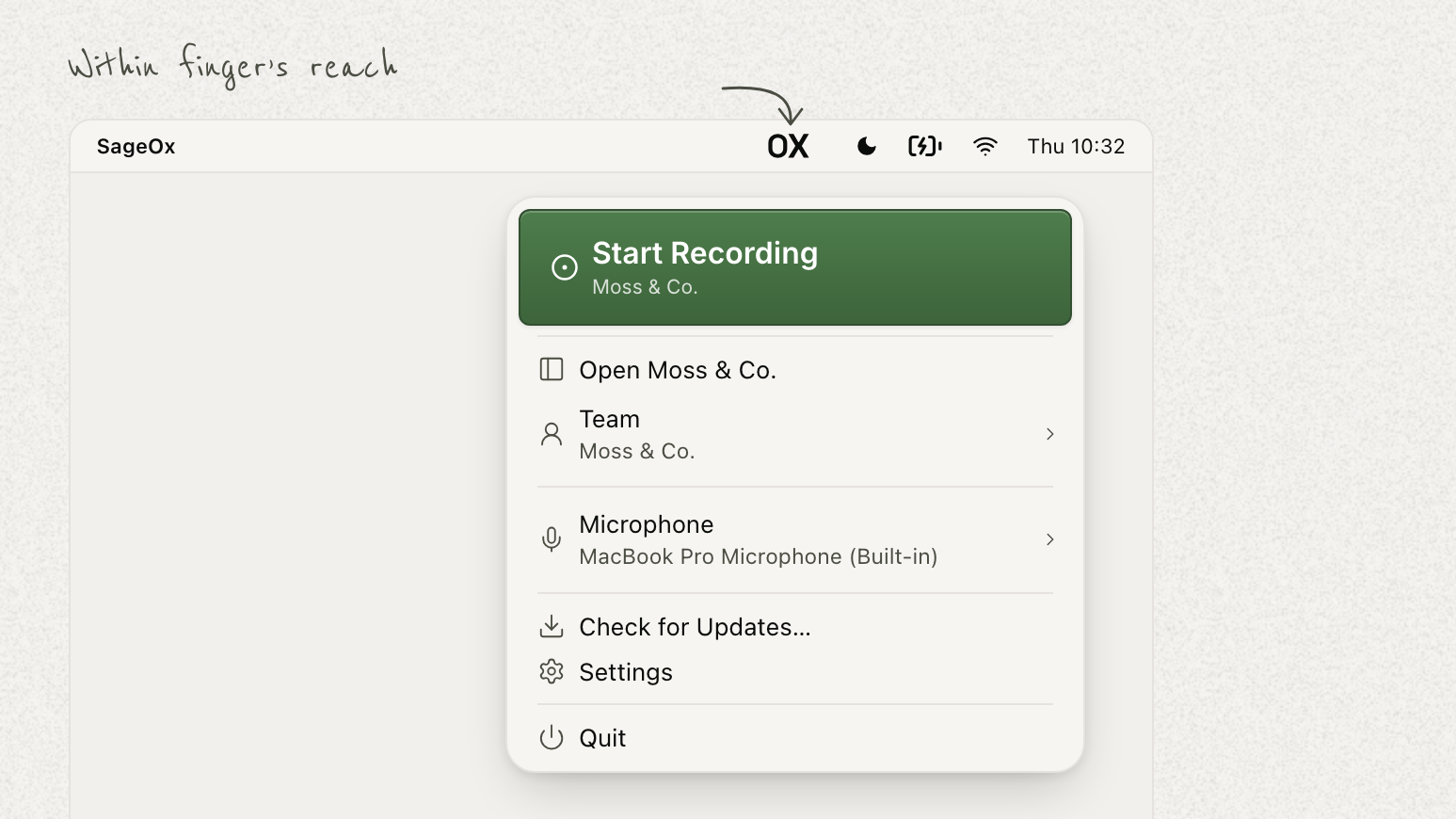
Record both sides of a call from your menu bar — your voice and everyone else's.

SageOx for Mac
  • Available today for macOS 14.4 and later. Download it for Apple Silicon or Intel, sign in, and record.
  • Both sides of a call, from the menu bar. One click captures your voice and everyone else's, so a Zoom, Google Meet, or Teams call arrives as a whole conversation instead of half of one — never your screen.
  • Pause, stop, or discard without opening a window. A live timer and a "Hearing you" indicator confirm it's running, and a recording you don't want can be thrown away before it's kept.
  • Auto-record into a chosen team. Settings → Recording picks where a detected meeting is captured, and can end the recording when the meeting ends, with a brief chance to undo.
  • Offline is not lost. Audio stays on the Mac and is delivered when the connection returns; keep SageOx open and it finishes saving.
  • Ask your coding agent about the call you just had. The discussion lands with a summary, the decisions, and the next steps, and connecting over MCP lets Cursor, ChatGPT, or Claude answer questions about what was said — no re-explaining the meeting.

Get SageOx for Mac, or read the setup guide.

Agent Toolkitv0.8.0

Agent Toolkit v0.8.0: Token-Based Team Ledger Access

Team authentication now relies solely on your team access token, and ledger reads for team tools sync automatically using that same token.

  • Token-only authentication. Team features authenticate only with your team access token, never a login on disk, and a manifest that still points at a mounted login file will not load until you replace it with the token.
  • Automatic ledger sync for team tools. Session and recent-activity lookups now sync each repository bound to your team using your existing team token, removing the need to supply separate Git credentials or run a companion sync process.
  • Per-read authorization checks. Each ledger read over the team token confirms with SageOx that the current credential may access that specific repository, and rechecks if the credential changes before returning results.
  • Clear status while first syncs complete. A large ledger's first sync can take most of an hour, and status reporting shows an initializing state until that sync finishes.
  • Defined lookback window for work updates. Work updates read through this new sync reach back up to eleven hours, with the exact starting point now reported alongside recent activity results.
  • Retired externally supervised sync mode. Repositories that sync from their own ledger Git remote keep working as before, but team tools no longer read a checkout kept by a separate ox daemon; if you ran one, stop it once it has pushed anything pending, then delete its checkout.

Full notes are on the v0.8.0 release.

Agent Toolkitv0.7.0

Agent Toolkit v0.7.0: Verified Digests and Updated Agent Image

Scheduled digests now only count as complete when they actually read their channel, and the base agent image moves to ox 0.17.0.

  • Verified channel reads. Scheduled digest jobs now confirm they read their assigned channel before a run counts as complete, so failures no longer get recorded as successful digests.
  • Separate gates for read, summary, and post. Reading, summarizing, and posting are now tracked independently, so an early or incomplete read is marked partial instead of being mistaken for a quiet channel.
  • Source-cited summaries. Digest summaries must cite the messages they read and cannot include links absent from those messages, keeping posted digests grounded in actual channel content.
  • Simple migration path. Operators can move existing digests to the new source declaration and remove manual reading instructions from their skill definitions, while jobs without it continue to work as before.
  • Updated agent image. The base agent image now ships ox 0.17.0, with all toolkit commands returning the same fields and flags as before.
  • Stricter status checks. Running ox status directly now exits non-zero when signed out or outside an initialized repository, while the JSON form continues to exit zero.

Full notes are on the v0.7.0 release.

CLIv0.17.0

Team rules load natively in your coding tool

A rule scoped with globs: now activates the moment you open a matching file.

  • Team rules land in the folder your coding tool already reads. Claude Code, Cursor, Copilot, Cline, and Kiro each have one, so a rule scoped with globs: activates the moment you open a matching file instead of only being mentioned at session start.
  • Share a skill you wrote with your whole team. ox skills publish copies a skill from your repo into Team Context so your team's AI coworkers get it too, and ox skills list shows every skill in the repo and whether ox, your team, or you put it there.
  • See exactly what a team skill would run before it can. ox skills approve covers precisely the content you reviewed and is recorded in the repo, so teammates inherit the approval and a changed skill asks again; ox skills revoke withdraws it. A crafted skill name can no longer write outside its own folder.
  • --no-input for unattended runs. Every prompt, spinner, and editor is off, so ox never sits waiting when CI, a script, or an AI coworker is driving it — a command that needs a choice fails immediately and says what to pass instead.
  • Refreshing a 16,600-file Ledger takes seconds, not an estimated two hours. A busy server no longer makes sync give up on files it could have fetched, and ox sync --read-only --json reports how far it got and what it skipped.
  • Plan review is obvious to enter and easy to leave. r toggles it on every plan, Esc closes the open note and then leaves review, and review mode survives the reload each time your AI coworker applies a fix.

Full notes are on the v0.17.0 release.

Console

Book an onboarding session, right from the home page

A short form on sageox.ai hands you straight to a real time slot with the team — no email back-and-forth.

  • "Grab some time" on the home page opens a short pre-screening form — just an email, plus optional notes on team size, current tooling, and what you're hoping to solve.
  • Submitting hands you straight to a real booking calendar, not a "we'll be in touch" holding page.
  • Open to every visitor now, not just the team that's been dogfooding it since last week.
Console

Slack publishing for every team

Connect Slack and choose the channels for discussion murals, live links, team murals, and welcome notes.

  • Slack publishing for every team. A team admin can connect a workspace from Settings → Communication without joining an early-access cohort.
  • Four kinds of post, chosen per channel. The mural from each discussion when it wraps, a join-now link the moment a live discussion starts, a nightly mural of what moved on the team, and a welcome note when a coworker joins — each one a per-channel choice in the team's notification destinations.
  • Outbound only in this release. SageOx sends to the channels you choose; Slack search and message ingestion remain outside this rollout.
  • See it and disconnect it. Communication settings list every connected workspace and channel, with a confirmation step before access is removed.
CLIv0.16.0

Your team's conventions reach every AI coworker

Publish a skill or a rule once and it lands in every teammate's coding agent, in every repo.

  • Publish a skill or a convention once, for the whole team. What your team publishes reaches every teammate's AI coworker, in every repo, whichever coding agent they use — and disappears everywhere when the team retires it. One design system can hold across a desktop app, a mobile app, and a website without hand-copying the same conventions into three repos forever.
  • Scope a team rule to the files it is about. A team rule can carry globs:, so one Go-idioms rule applies across every repo but only in sessions that touch .go files — no more choosing between spending context in every session and keeping per-repo copies that drift.
  • Amp, Droid, Goose, OpenCode, and pi receive them too. ox init used to select these coworkers, report success, and install nothing. They now get the same skills every other supported coworker does.
  • ox skills status says why a skill isn't on your machine. A checkout that never cloned, a skills folder that never materialized, a repo no rule targets, and a team that published nothing all look identical from your repo: nothing there. Each line now ends with the command that fixes it.
  • Reading a large Ledger is several times faster, and keeps what it fetched. Content downloads in parallel with retries, an interrupted sync no longer discards its progress, and one object the server won't serve no longer hides the thousands of healthy ones behind it.
  • brew install sageox/tap/ox installs ox. The command in the README used to resolve to an unrelated text editor of the same name.

Full notes are on the v0.16.0 release.

Agent Toolkitv0.6.1

Agent Toolkit v0.6.1: Smarter job timing and readable channel exports

Job scheduling now respects the time actually left in a turn, stranded tool calls are now recorded, and large channel exports are easier to read from disk.

  • Accurate job timing. job_run now checks how much time is truly left in the current turn instead of the turn's full length, so jobs that fit are started rather than mistakenly waited for near a turn's end.
  • Safer defaults under load. When multiple turns are active at once, job_run uses the tightest deadline among them, meaning a job may start sooner than expected rather than risk losing its result.
  • Clearer timeout messages. A job's response no longer incorrectly claims it is longer than the turn when the turn itself simply ran out of time.
  • Visibility into stranded calls. The gateway now logs a stranded tool call when it finishes after its turn has already ended, so previously invisible lost results are now recorded and named once.
  • Easier-to-read channel exports. Large read_channel results now write one message per line, so file-based tools can page through them without hitting a single oversized line.
  • Optional text truncation. Callers can set maxTextChars to shorten long messages in a channel export, with truncated entries clearly marked.

Full notes are on the v0.6.1 release.

Agent Toolkitv0.6.0

Codex or Claude as the brain

Pick the model behind a coworker, and a handoff between two of them stops echoing.

  • Codex can run as a coworker's brain, alongside Claude. Select it with sageox-agent brain codex [--model <id>]; both providers share channel sessions, memory, MCP tools and the same gateway-enforced permissions.
  • One handoff is one ack. A reply to a sibling coworker no longer mentions it, and on Buzz that mention is the only thing that wakes one — so a handoff no longer echoes into six messages, five of them coworkers declining to speak. A reply to a person still carries the mention.
  • read_channel takes a time window, and the gateway's clock cuts it. withinHours: 24 becomes the surface's own filter, so a digest job can't open a window past the newest message and report the busiest day as "nothing in the last 24h" with the read still returning ok.
  • An argument a tool doesn't declare is refused, not dropped. withinhours used to parse as a read with no window and hand back the whole channel to a caller that believed it asked for a day.

Chart 0.15.0 adds persistence.jobCodeIndex — off by default — to share the coworker's warm code index with scheduled command jobs read-only, and refuses worker beside prompt: true. Existing Claude coworkers need no changes. Full notes are on the v0.6.0 release.

Agent Toolkitv0.5.2

Markdown that renders on Slack

Emphasis, headings, lists and links arrive rendered instead of showing their punctuation — nothing to turn on.

  • Every Slack reply reads differently, and there is nothing to turn on. A reply used to leave the gateway as the brain wrote it, so **bold** and [#305](https://example.test/pull/305) arrived with their asterisks and brackets showing.
  • The transport applies the dialect, not the persona. A fleet shares one reply contract, so "write Slack's dialect" can't be said to one coworker; adapter-slack translates on egress instead, leaving code spans untouched.
  • A page request is still just words. The translation runs after the escape, so [page everyone](!channel) stays text and <!channel> notifies nobody.

One thing to check: a coworker steered to write Slack's dialect itself now produces _bold_ — drop the steering. Buzz and console egress is byte-identical, and no chart setting or manifest field moved. Full notes are on the v0.5.2 release.

Console

A lighter public site, and docs that ship on their own clock

The homepage, blog, changelog and docs keep every URL they had, load lighter, and now ship without waiting for a product release.

  • Public pages stop carrying the app around. A visit to the homepage, a blog post, the changelog or a docs page no longer loads the signed-in product's code. The one thing a public page still asks the product is whether you are signed in, so the header can offer the way back in.
  • Docs pages carry the whole site. Every page under /docs now has the site footer and the "Go to app" link, and a page that is still being written stays unpublished until it is ready — everywhere the docs run.
  • Agents keep the address they were given. The public docs MCP server answers at /docs/api/mcp, /api/docs-mcp redirects there permanently, and the /.well-known discovery manifests name the new address.
  • Words ship without a product release. A new blog post, changelog entry or docs page reaches sageox.ai on its own, rather than riding the next release of the signed-in app.
Agent Toolkitv0.5.1

A scheduled job that can think

A job's body may be a prompt, so a coworker can do light scheduled work only its brain can do.

  • A job's body may be a prompt. A jobs[] entry declares one body: run for a process in its own pod, or prompt for a brain turn in the gateway — so reading one channel at 18:00, summarizing it, and posting to another needs no clock outside the coworker, where its kill switch and doctor can't see it.
  • The prompt is a reviewed page, named not pasted. prompt takes a short inline string or { skill: <name> } from the bundle's own skills/, read at load and refused there. No channel text can start one of these turns or edit its prompt.
  • An external worker deploys on managed Kubernetes again. The 1.34 floor read v1.34.9-eks-… as a prerelease and refused every cluster it was meant to admit. Chart 0.13.1; the runtime is untouched.

Chart 0.14.0 pairs with this release in one direction only — a 0.5.0 gateway refuses a manifest declaring a prompt job, so mirroring one in values must take imageRef to 0.5.1 in the same pass. Full notes are on the v0.5.1 release.

Agent Toolkitv0.5.0

Say it once, and know why it didn't run

A job announces without keeping state, a parked job reads as parked, and a manifest can be checked before it merges.

  • A job can announce something once, with no state to keep. report.history: true beside report.probe: true gives it channel_history on its report channel, so the messages already posted are the record — a run that died halfway re-posts only what it missed.
  • A parked job reads as parked. Every terminal run record classifies its admission — armed, parked, or a human's run of a parked job — so a job somebody stopped stops looking like one whose switch was never written.
  • The reply is the answer, not the narration. Chat replies keep the final answer instead of replaying narration that later tool calls superseded; ids, timings and gate details stay in the operator record.
  • A manifest can be checked before it merges. sageox-agent validate <path…> exits non-zero naming the field and the expectation, with no agent home, no credentials and no network — runnable straight from the image.

Helm chart 0.13.0 refuses a worker Secret an agent already mounts, and an external worker on a cluster below Kubernetes 1.34. Park armed external jobs across the upgrade — the gateway and dispatcher roll independently, and there is a window where dispatch fails. Full notes are on the v0.5.0 release.

Console

Activity is on for every team

The Activity card on your team home page — who moved what today, in plain sentences, with links back to the source — is no longer limited to an early-access cohort.

  • Your team's day, on your team page. Activity distills the work your people and their AI coworkers did into one credited line each, grouped into windows of the day, with the murmurs, plans and discussions behind every line one click away.
  • No cohort to be in. Activity was reaching only accounts inside an early-access cohort. That gate is gone, so the card is simply part of the team page now.
  • Times are cut on the team's clock. Window labels like "Overnight" name real hours in your team's timezone rather than the reader's, so the same day reads the same way for everyone on the team.

Activity appears once there is something to show — a team with no connected repositories and no recorded work still sees the get-set-up screen instead.

Agent Toolkitv0.4.1

A job can hand back an answer

Reviewed jobs return structured results through job_status, and a run can leave a record you can count.

  • A job can answer, not just report that it ran. A reviewed external job opts in with output: {format: json} and returns bounded structured JSON through job_status, kept for seven days and released only on an explicit read by the author who asked, in the conversation they asked in. Output that is missing, invalid or blocked erases neither the execution facts nor a valid gate, and a delivery that fails never reruns the job.
  • A run leaves a record you can count. AGENT_WORK_EVENTS=1 — or agents.<name>.workEvents in chart 0.12.1 — emits bounded, versioned start and completion records from the scheduled and chat hosts alike, and a job report can carry typed artifact, subject-state, usage and health facts alongside them. Child diagnostics stay out of the host envelope, as do raw gate details, requester information and parameters.
  • A verdict file has a size and a shape. Local verdict artifacts cap at 64 KiB and must be regular UTF-8 files rather than symlinks; an oversized or invalid report leaves its gate unproven instead of trusted.

Answers and work events are both opt-in, and no agent.yaml that works today needs a new field. Bring the gateway, dispatcher and worker images to the same release before turning structured answers on, and check JOB_OUTPUT_SCHEMA_VERSION or JOB_WORK_SCHEMA_VERSION before emitting a new artifact section — an older host rejects fields it doesn't know. Full notes are on the v0.4.1 release.

Agent Toolkitv0.4.0

Jobs on their own machine, and a ledger it can read

Work runs in its own pinned image, and the coworker can ask what the week held — or say why it can't answer.

  • A job runs on its own machine. External jobs run on demand in digest-pinned worker images on Kubernetes, behind a shared dispatcher that keeps run ids and verdicts across restarts, serializes requested against scheduled work, and refuses to start the same body twice. A failed run posts its failure and a redacted excerpt to the report destination and to the conversation that asked, so nobody has to know to go looking; the full redacted output stays behind operator-only job diagnostics for seven days.
  • Ask what the week actually held — or hear that it can't say. team_status checks search access and each repository's ledger separately, and team_sessions answers only once credential access, repository identity, ledger availability, and a refresh inside five minutes have all been verified. Missing or stale data is refused instead of arriving as an empty week that looks like a quiet one.
  • What's been moving lately. team_recent returns work updates and session activity newest first over an explicit window — 72 hours by default, seven days at most, 20 results — and says so when it truncated rather than trailing off.
  • The same question, asked of the code. code_insights joins the most-changed files, recent commits, and open pull requests and issues from the read-only checkout the coworker already has. A repository with nothing indexed reports unknown, not none, so "no open pull requests" and "never looked" stop reading the same.
  • The ledger stays fresh without a daemon. A team brain's ledgerSync entries name the repositories and HTTPS remotes the gateway should clone and refresh, reusing Git credentials already mounted. It never starts an ox daemon and never pushes, and an authentication failure waits for the mounted credential to change rather than retrying against a token already known to be dead.
  • A sibling coworker can't park your kill switch. The gateway is the only thing that ever saw who sent a message, so it now hands the turn's author to the switch: a park is refused when it comes from a recognized coworker the manifest doesn't name. It narrows rather than seals — a surface that can't identify a coworker still admits the park, because refusing those would refuse a person's park too.

The Helm chart moves to 0.12.0. Before upgrading, add top-level killSwitchParkBy to every agent.yaml with a job that declares a killSwitch — [] to refuse every recognized coworker, or the ids whose park this coworker honours — because a manifest without it will not load. Existing coworkers opt into the new tools by re-running sageox-agent memory add team, sageox-agent repos add <url>, and sageox-agent mcp add jobs. External jobs need Kubernetes 1.34 or newer and their own worker setup; all of it leads the v0.4.0 release.

Agent Toolkitv0.3.1

One clock, and a gate in its own words

The brain's tool calls are bound by the turn, and a passing gate's sentence can post as written.

  • A job short enough to wait for finishes the wait. The brain's tool-call clock now takes its bound from limits.turnTimeoutMs, the same number job_run weighs a job's deadline against — so a run it decided to wait for is no longer abandoned partway through, telling the channel the job produced nothing right before the job posts its own correct result.
  • A passing gate can speak in its own words. Declare report.proven: verbatim and a passing gate's sentence posts as written, without the machine PROVEN: in front of a shift report meant for a person to read. FAIL and UNKNOWN keep their label under every setting.

Nothing new to set, and no agent.yaml that works today stops working. Full notes are on the v0.3.1 release.

Agent Toolkitv0.3.0

Reads the room, answers where it was asked

It can list its channels, name who's in them, wake one person — and answer in the thread that asked.

  • It can read the surface it's already on. Which channels am I in, who else is in this one, who is this id, what was said — four reads answered by the surface itself rather than by agent.yaml, so a channel it was never invited to shows up as the reason nobody is talking to it.
  • A post can wake one person or coworker. post_message takes a mention and each surface renders it as its own addressing primitive — a p tag on Buzz, <@id> on Slack — so a cross-post reaches somebody instead of only informing a room.
  • The answer comes home to where the question was asked. For an hour after an addressed post, that principal's replies are brought back into the asking thread verbatim, so a person in Slack can put a question to a coworker on Buzz and read the answer where they asked it.
  • A long job replies in the thread it started from. A run that outlasts the turn now answers the message that asked for it, instead of leaving its verdict in the job's report channel for somebody to go and find.
  • A 3am tick can read the coworker's checkouts. The chart's new persistence.jobCheckouts mounts the coworker's repository clones into its CronJob Pods, so a scheduled body starts on warm code rather than on a clone it cannot afford inside its budget.
  • Team memory says when it's broken. A rejected SageOx credential now names itself at launch and tells the turn not to answer as if team memory had worked, rather than sending every question to the model alone in silence — and a rotated token is picked up without a restart.

The Helm chart moves to 0.11.0, and the cap that stops two coworkers answering each other now holds on Buzz as it does on Slack. Three things need acting on when upgrading from 0.2.0 — they lead the v0.3.0 release.

Agent Toolkitv0.2.0

Sharper on Slack, steadier on schedule

Mentions arrive as names, missed DMs get answered, and a scheduled tick runs wherever the cluster puts it.

  • A mention is a person, not an id. Slack mentions arrive as the names your team uses, so the coworker can answer a question about someone instead of about <@U04…>.
  • A reply addresses only who it meant to. The brain's text is escaped before it posts, so an @channel it happened to type reads as words rather than paging the room — and the turn still ends in an answer instead of an error.
  • Messages sent while it was down get answered. A coworker that comes back picks up the DMs it missed, and a job that posts to a thread can read that thread back, so a roll call in Slack has replies to count.
  • Scheduled work stops hanging. A tick runs wherever the cluster places it instead of only on the coworker's own node — no more jobs that sit in init until their deadline kills them, with nothing in the log to say why.
  • The kill switch parks automation, not people. A job whose switch is parked still runs when someone asks for it by name.
  • Credentials the gateway never holds. A bundle can declare which of a job's secrets belong to the job alone, and a launch that's missing one names the field that would let it start.

The base image now pins ox 0.14.3. Full notes are on the v0.2.0 release; the quickstart is the place to start if you haven't run one yet.

Agent Toolkitv0.1.0

An AI coworker in your team's channels

Open source and yours to run: one AI coworker across Buzz and Slack, starting from your team's memory.

  • One coworker, both surfaces. Buzz and Slack at the same time, with one persona, one memory, and one face on each — threaded replies, reactions, DMs, and cross-posting from either side. A cursor survives restarts, so it catches up on what moved while it was down instead of missing it.
  • It starts with what your team already decided. Connect it to SageOx and team_search gives it read-only recall over your Discussions, decisions, docs, and prior Sessions. It reads; it never writes back, so no answer it gave at 3am becomes a fact a colleague cites six months later.
  • The model holds no keys. MCP servers run inside the gateway, which owns every credential and decides what actually runs — a coworker reading an open channel can ask for an action, never take one. Every tool call is logged, allowed and refused alike, with arguments recorded by declaration instead of in the clear.
  • Set it up in one sitting. sageox-agent create interviews you for purpose, approval boundary, voice, and look, then run has it answering in your terminal on a mock brain — no runtime account, no key, no model spend.
  • Work it does on its own. Scheduled and event-driven jobs are declared beside the surfaces they report to, each with a kill switch only a human can arm, single-flight, a wall-clock budget, and a run record for every tick — including the ones that never ran.

Start with the quickstart; a multi-arch image, a Helm chart, and Terraform for AWS EKS ship with it. Full notes are on the v0.1.0 release.

Console

Notifications in the top bar

New discussions, team events, and merge suggestions collect in one place, so you can catch up on what happened while you were away.

  • One place to catch up. New discussions, team events, and merge suggestions collect in the top bar. Open it to see what you missed, and mark everything read when you're done.
  • Choose what reaches you. Per-channel preferences in your settings keep in-app notices on while you tune email separately, one notification type at a time.
  • Team routing, set once. A team decides where its events are published from the team notification settings, so it's one choice for everyone instead of a per-person guess.
  • Read state follows you. Mark something read on your laptop and it's read on your phone too.
Console

A clearer account home and a redesigned Security page

Your settings reorganized around what needs attention: expiring credentials, a security posture at a glance, and provenance on every key.

  • See what needs attention first. The redesigned Security page opens with an attention tray for expiring access tokens, stale credentials, and a missing passkey, so the thing to act on is the first thing you see.
  • Your security posture, at a glance. A posture band shows how many credentials you have, their types, and a seven-day activity trend in one line.
  • Know where each credential came from. Every credential row shows both when it was added or paired and when it was last used.
Console

Faster, sharper transcripts

Transcripts arrive within minutes of a Discussion and read cleaner, with steadier speaker labels, including live transcription for Discussions captured through Zoom.

  • Your transcript is ready in minutes. It lands shortly after a Discussion ends, instead of after a long wait.
  • Zoom Discussions transcribe as they happen. Discussions captured through Zoom now get the same live treatment as the rest.
  • Cleaner text, less noise. Filler and dead air stop turning into phantom words, so the transcript reads closer to what was actually said.
  • Speaker labels that hold. A speaker keeps the same name across a Discussion, so labels stop flipping mid-sentence.
Console

Live Highlights shows where the Discussion has arrived

A fullscreen room surface that shows the through-line of a Discussion as it happens, with recent highlights, who's speaking, and a QR to join.

  • The room sees the conversation, live. During a recording, Live Highlights shows the Discussion's through-line up top with the most recent highlights beneath it, aging out as the Discussion moves on.
  • Know who's in the room. A live speaker rail tracks who's talking, and a join QR lets anyone add themselves to the Discussion without breaking stride.
  • Pick the view that fits. Switch between Highlights, Calm, Summary, and Murals from one control. Same surface, tuned to the moment.
Console

New ways to sign in, and control over your account

Continue with Apple, a verification code at signup, and self-service email changes.

  • Continue with Apple. Sign in or create an account with Apple, alongside the existing options, including the native flow on the Ox App.
  • Verified from the start. New email-and-password signups confirm a six-digit code, so an account is tied to an address you actually own.
  • Change your own email. Update the email on your account yourself from settings. No support ticket, no waiting.
Console

Visual plans your team can act on

Your AI coworker authors a visual plan; your team reviews it, and it stays linked to the PR it shaped.

  • Plans are visual, not walls of text. Ask your AI coworker for a plan and it writes a rich, interactive page with diagrams, timelines, and comparisons, built to be decided on in ten minutes.
  • Authored for you. You prompt in Claude Code or Codex; your coworker runs the ox CLI on your behalf to enrich, save, and render the plan.
  • Grounded in your team's context. A plan cites the architecture decisions your team already wrote down, and flags where a coworker is already working in the same place. Every claim points at a real artifact, never a guess.
  • Browse them as a team. Every saved plan lands in your team's Plans gallery in the console, newest first.
  • Linked from the PR. When the work ships, the pull request carries a credit line back to the session and plan that produced it, so the reasoning travels with the code.

Read the Plans docs to see how to prompt for a great one.

Console

Team Vocabulary teaches transcripts your words

Add the names, products, and jargon your team says out loud, and transcripts stop mis-hearing them.

  • Add a term once, everywhere gets it right. A vocabulary page in your team settings takes names, acronyms, and product words so transcripts spell them the way your team does.
  • Fix it from the transcript. Spot a mis-transcribed term while reading? Add it to your team vocabulary inline, without leaving the page.
  • Candidates surface themselves. Frequently mis-heard terms show up as suggestions you can promote, so the list improves as you use it.
Console

Photos and files, right in a Discussion

Add a photo or a file to a Discussion from the camera button when you join, or from the Photos card afterward, and see it inline with the transcript.

  • Snap a photo as you join. A camera button on the join screen adds a whiteboard shot or a room photo straight into the Discussion as it happens.
  • A Photos card on every Discussion. Images and files collect in one card, laid out on the timeline so you can see when each was added.
  • Inline where the moment happened. Attachments embed in the transcript at the point they were captured, so a diagram sits next to the words that explain it.
Console

Revoke a share link from the sheet

Created a share link by mistake? One click revokes it, and only it.

  • Revoke right in the share sheet. No bouncing to a separate settings page. The link you just created can be revoked from the same surface.
  • Links you already shared keep working. Routine credential rotation on our side no longer breaks live share links.
  • Revocation is per link. Ending one shared URL leaves every other link to that bubble working.